Problem
Getting dressed every day should be simple, yet many people struggle to create polished outfits using the clothes they already own. While users often have versatile wardrobe essentials, they lack confidence when combining clothing with accessories, shoes, and colors that work well together. As a result, they repeatedly wear the same combinations, spend unnecessary time deciding what to wear, and often purchase new clothes instead of making better use of their existing wardrobe. These research findings highlighted an opportunity to design a solution that reduces styling uncertainty while promoting more intentional wardrobe use.
Solution
StyleMe is a mobile wardrobe styling application designed to help users build stylish outfits from the clothing they already own. By combining wardrobe organization with personalized outfit and accessory recommendations, the app guides users through a simple styling flow based on their wardrobe, preferred style, and occasion. Rather than encouraging more shopping, the experience focuses on maximizing existing wardrobes, reducing decision fatigue, and helping users feel more confident in their everyday outfit choices.
My Role
UX/UI Designer
As the UX/UI designer, I led the project from research to the final prototype. I conducted user research, designed the user experience and interface, and refined the solution through usability testing and iteration.
Timeline
5 Weeks
Tools
4 Main Tools
Figma
Research
Understanding the problem from both a business and user perspective was essential to designing an effective solution. I began with secondary research to explore current fashion trends, consumer behaviors, and market opportunities, then conducted primary research to gain a deeper understanding of users’ everyday styling habits and challenges. By combining industry insights with real user experiences, I was able to identify key pain points, validate assumptions, and define the core features that would provide the greatest value throughout the design process.
Secondary Research
I began by reviewing industry reports and fashion trends to better understand the current landscape. Research revealed a growing shift toward intentional shopping and making better use of existing wardrobes. According to the Boston Consulting Group, Gen Z and Gen Alpha are expected to account for 40% of global fashion spending by 2035, while 41% of Millennials and Gen Z identify with a capsule or minimalist wardrobe. Despite this shift, many people still struggle to style versatile wardrobe basics into polished outfits, highlighting an opportunity for a solution focused on personalized styling rather than encouraging additional shopping.
SWOT Competitive Analysis
As part of my secondary research, I conducted a SWOT analysis of three existing platforms—Whering, Stylebook, and Pinterest—to better understand how current products support wardrobe management, outfit planning, and styling inspiration. While each platform offers valuable functionality, the analysis revealed a common gap: users still lack quick, personalized styling guidance based on the clothing they already own. These insights helped shape the direction of StyleMe and informed the key product features throughout the design process.
| SWOT | Whering | Stylebook | |
|---|---|---|---|
| Strengths | AI-powered wardrobe organization and outfit planning. | Comprehensive wardrobe management and outfit tracking. | Endless fashion inspiration and trend discovery. |
| Weaknesses | Time-consuming wardrobe setup before users see value. | Outdated interface and limited personalization. | Inspiration isn't personalized to users' own wardrobes. |
| Opportunities | Expand AI styling and accessory recommendations. | Smarter outfit suggestions based on occasions. | Personalized inspiration using users' existing wardrobes. |
| Threats | Increasing competition from AI styling apps. | Modern competitors offering more intelligent experiences. | Competition from social media and AI-powered styling platforms. |
Interviews
To better understand users’ everyday styling habits, I conducted five semi-structured interviews with participants from different professional backgrounds. The interviews explored how people choose outfits, what influences their styling decisions, where they seek inspiration, and the challenges they face when combining clothing and accessories. The goal was to identify recurring behaviors, pain points, and opportunities for improvement that could inform the product design.
Participants
- 5 participants
- Age range: 28–41 years old
- Occupations: Marketing Specialist, HR Manager, Software Engineer, Teacher, and Sales Representative.
Example Interview Questions
- Walk me through the last time you chose an outfit for work or a social event.
- How do you usually decide which accessories to wear with an outfit?
- What part of choosing an outfit do you find most challenging?
- Where do you usually get outfit inspiration?
- If getting dressed could become easier, what would that experience look like?
Key Insights
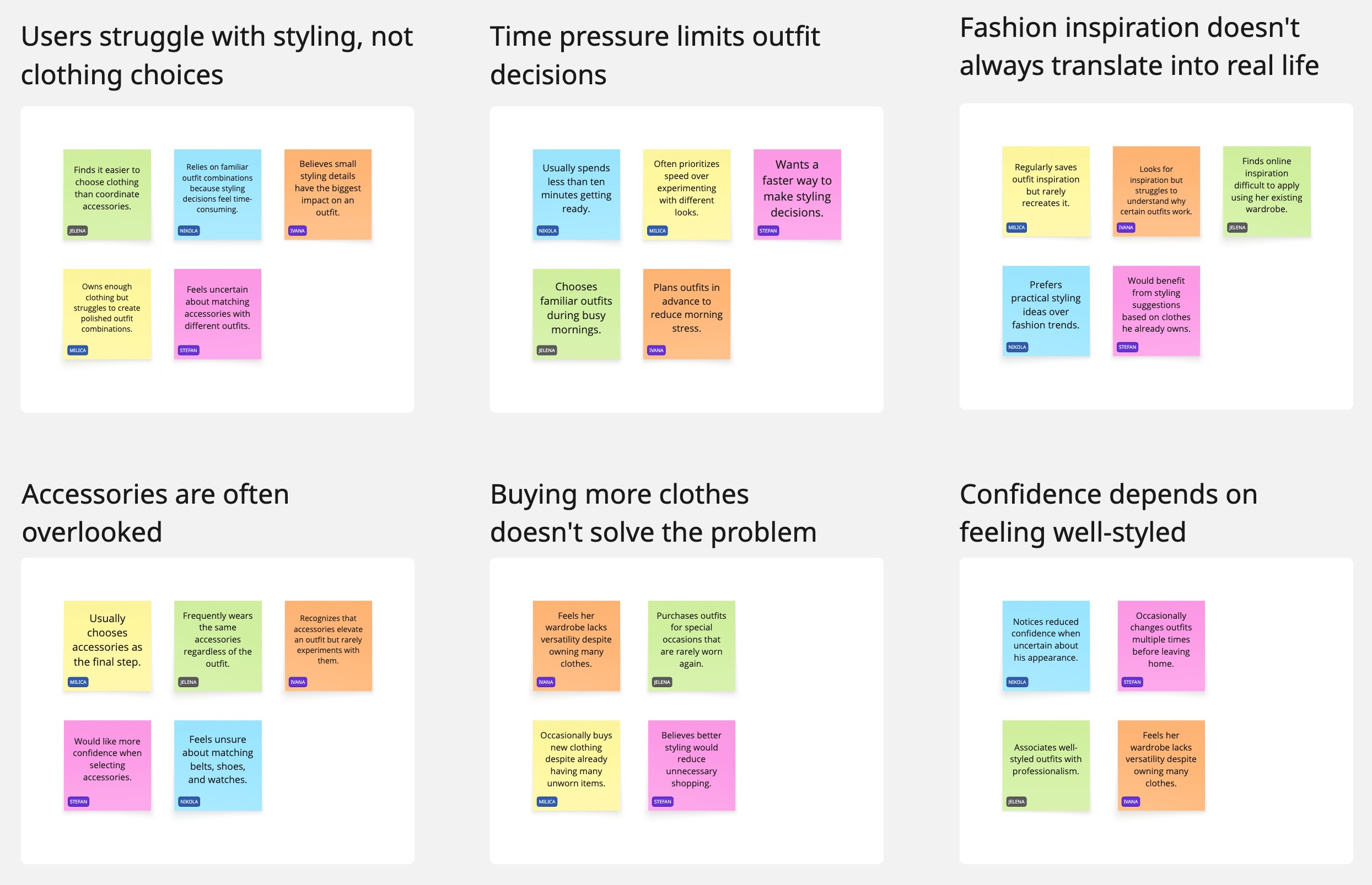
After completing the interviews, I synthesized participants’ responses using affinity mapping to identify recurring behaviors, motivations, and pain points. Organizing the findings into thematic groups helped uncover the most significant patterns across users, validate research assumptions, and prioritize the problems that the solution should address. These insights directly informed the persona, feature prioritization, and overall product direction.
Affinity Mapping
After synthesizing interview data, several themes consistently appeared across participants:
Users Struggle With Styling, Not Clothing Choices
Participants generally felt they had enough clothing, but struggled to turn those pieces into polished outfit combinations. Styling decisions, particularly combining different items and accessories, were more challenging than choosing the clothes themselves.
Time Pressure Limits Outfit Decisions
Limited time, especially during busy mornings, influenced how participants approached getting dressed. Rather than experimenting with different combinations, they often prioritized familiar outfits that required less thought.
Fashion Inspiration Doesn’t Always Translate Into Real Life
Participants regularly looked for outfit inspiration online, particularly on platforms such as Pinterest and Instagram. However, they often found it difficult to recreate those looks using their own wardrobe and understand what made the original outfit work.
Accessories Are Often Overlooked
Accessories emerged as an important styling challenge. Participants frequently treated accessories as a final step and felt less confident choosing pieces such as bags, shoes, belts, and jewelry that would complement their outfits.
Buying More Clothes Doesn’t Solve the Problem
Several participants felt they owned many clothes but still experienced the feeling of having nothing to wear. Purchasing new items, particularly for special occasions, did not necessarily solve the underlying difficulty of creating versatile outfits.
Confidence Depends on Feeling Well-Styled
Participants connected their confidence with feeling that an outfit was complete, coordinated, and appropriate for the occasion. When they were uncertain about their appearance, they were more likely to change outfits or fall back on familiar combinations.
Problem Statement
Based on the research findings, I defined a specific user problem around styling existing wardrobe pieces and creating cohesive looks.
Sophie, a busy professional, often struggles to create polished outfits using the clothes she already owns. Although her wardrobe contains versatile pieces, she lacks confidence in combining clothing and accessories into cohesive looks that feel appropriate for different occasions. As a result, she frequently relies on the same outfit combinations instead of making better use of her existing wardrobe.
How Might We Question
With the core problem identified, I reframed it as a How Might We question to define the opportunity for the product and guide the design process.
How might we help people effortlessly transform simple outfits into stylish, well-balanced looks by providing personalized accessory and styling recommendations that save time, reduce uncertainty, and build confidence in everyday dressing?
User Persona
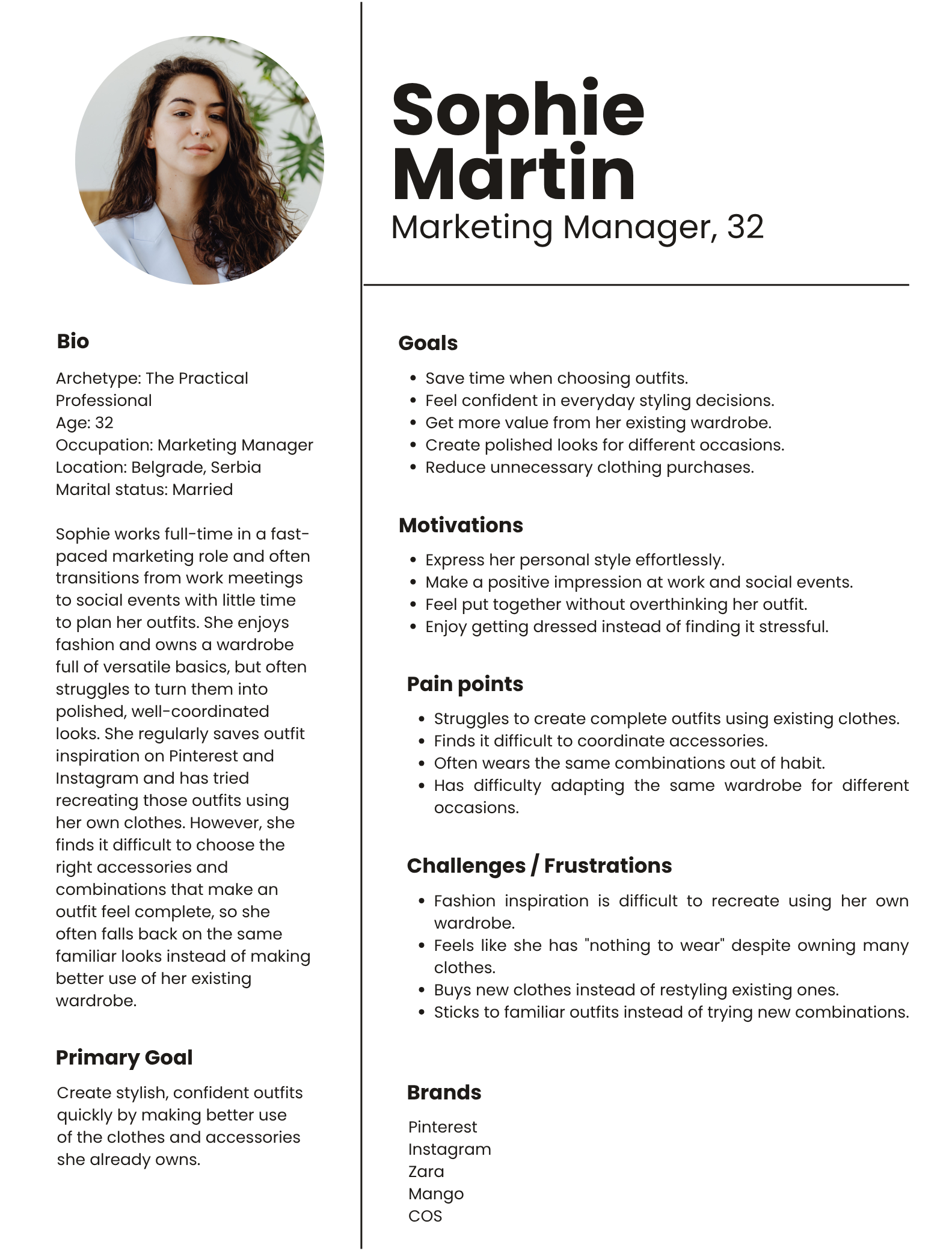
To translate the research findings into a clear representation of the target user, I created a persona based on the recurring behaviors, needs, and challenges identified during the interviews. The persona helped me keep the user’s goals and frustrations at the center of the design process and provided a reference point when making decisions about the product experience.
Sophie represents a busy professional who wants to make better use of the clothes she already owns but often lacks confidence when combining clothing and accessories. Her needs and frustrations helped guide the product toward a simpler, more personalized styling experience.
Information Architecture
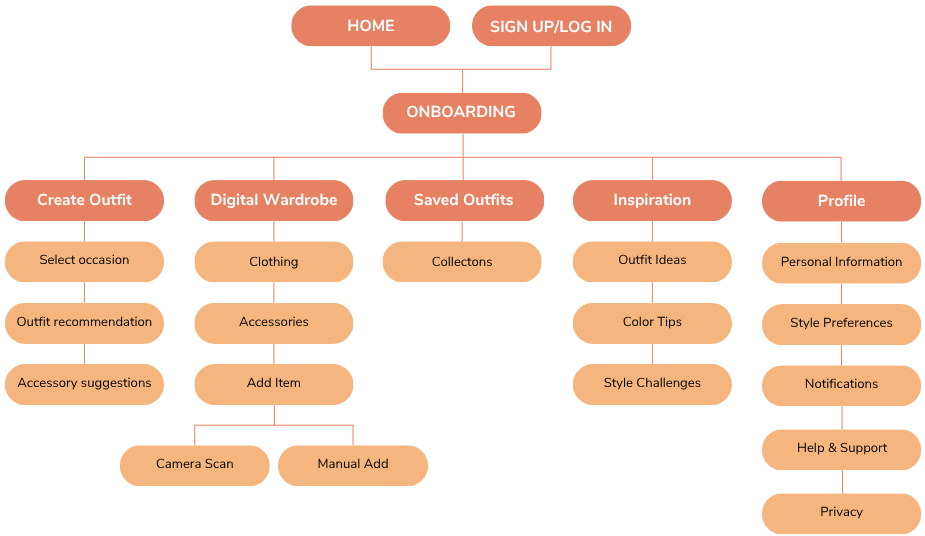
I organized the app’s content into clear sections to make the styling experience simple and easy to navigate. The information architecture centers around the core task of creating an outfit, supported by the user’s digital wardrobe, saved outfits, inspiration, and profile. This structure helps users move from selecting wardrobe items and preferences to receiving personalized outfit and accessory recommendations.
Sitemap
The main navigation is organized around five core areas: Create Outfit, Digital Wardrobe, Saved Outfits, Inspiration, and Profile. The structure also supports wardrobe management through clothing and accessory categories, as well as adding items manually or through a camera scan.
Feature Roadmap
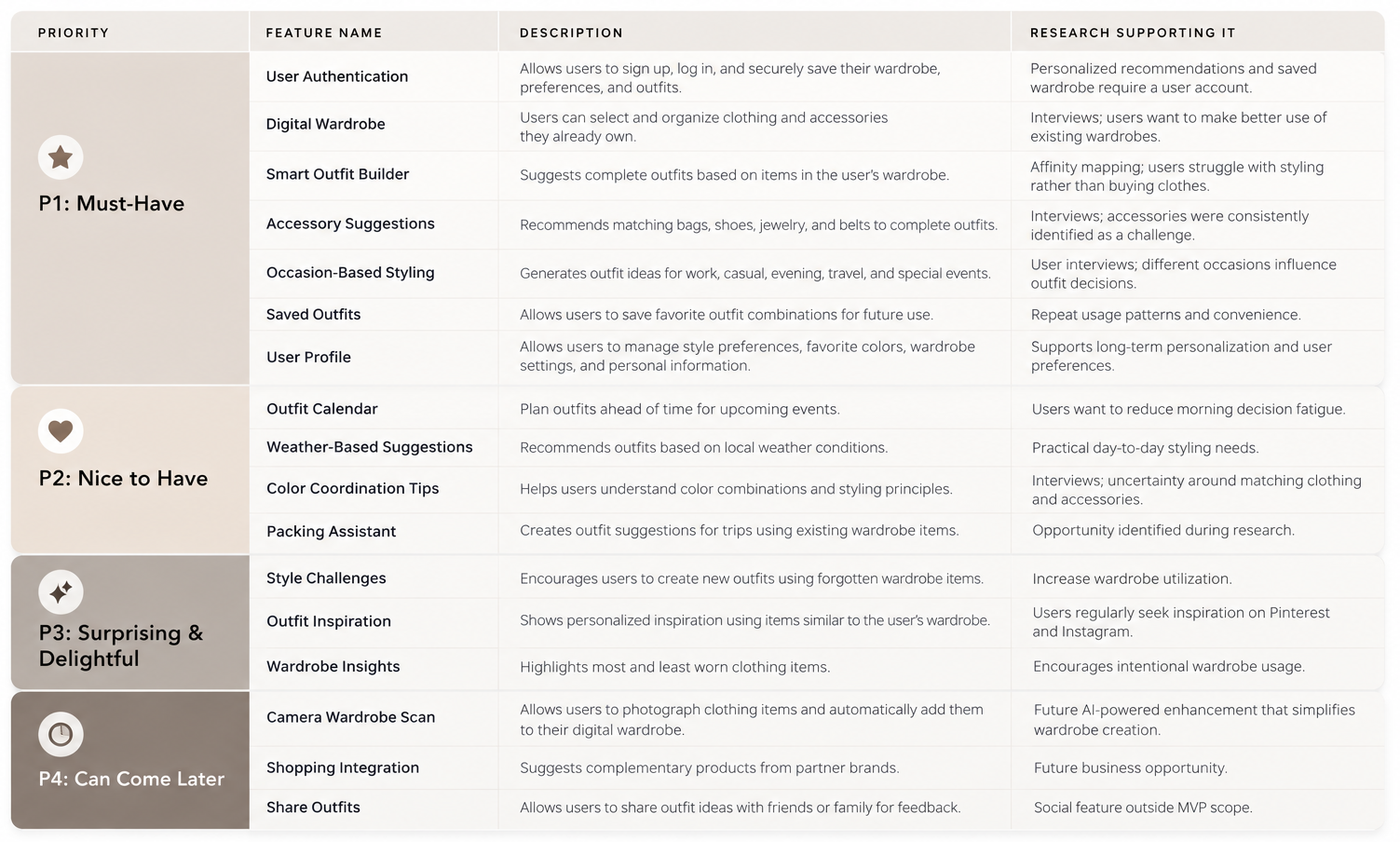
To translate the research findings into a focused product direction, I prioritized features based on their potential to simplify outfit creation and help users make better use of the wardrobe they already own. The roadmap distinguishes the core features needed to support personalized styling from additional features that could improve convenience, inspiration, and personalization as the product evolves. This prioritization helped define the initial experience while identifying opportunities for future iterations.
Core Flows
Mapping the Main User Journey
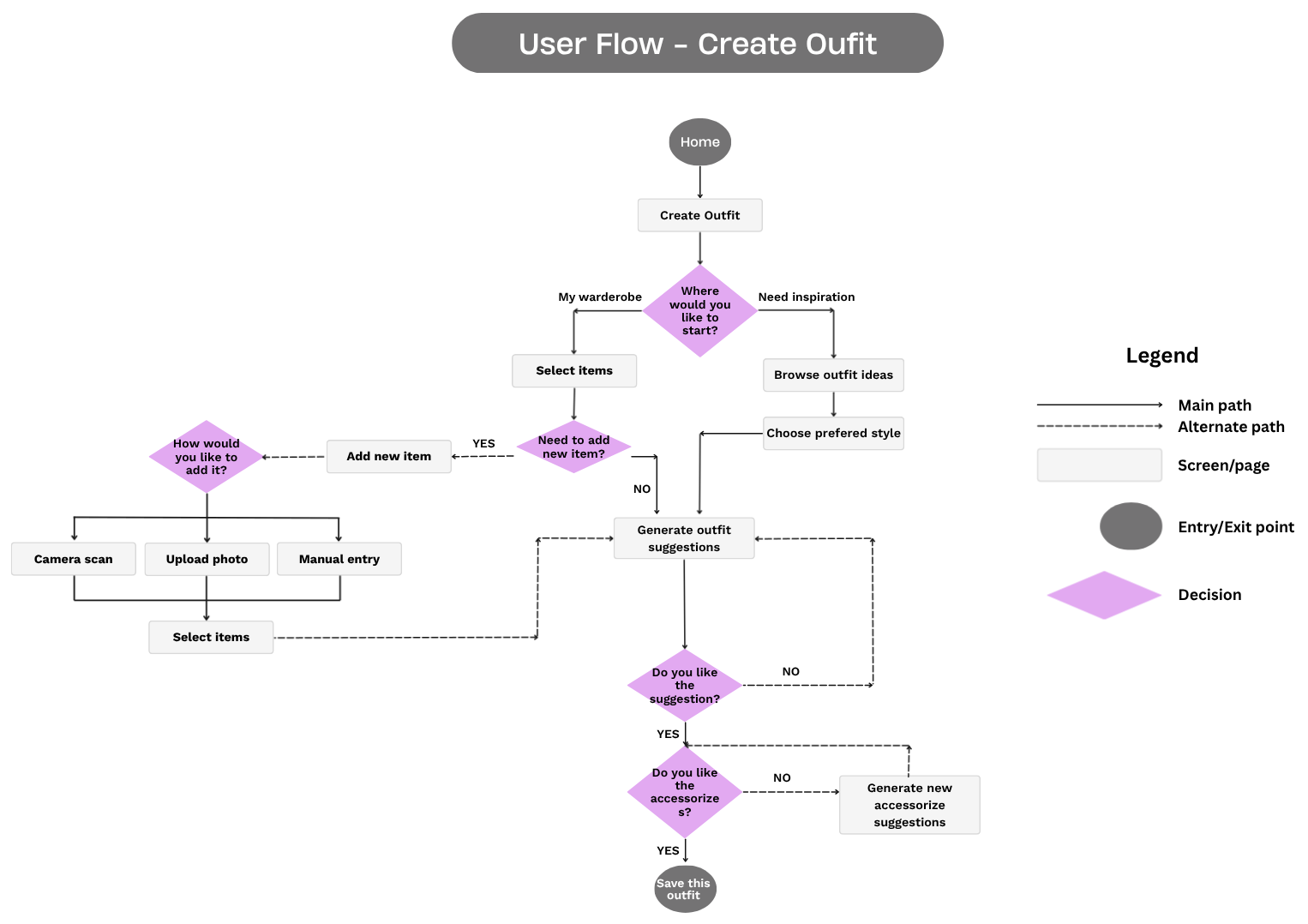
To visualize how users move through the core styling experience, I mapped the primary flow for creating an outfit. The flow focuses on helping users move from their wardrobe or inspiration to a personalized outfit, with opportunities to add new items, refine suggestions, and complete the look with accessories.
Create Outfit Flow
The primary flow begins when the user selects Create Outfit from the Home screen. They can choose to start with their My Wardrobe or browse Inspiration, select clothing items and a preferred style, and generate personalized outfit suggestions. From there, users can review the recommendations, adjust the outfit if needed, and receive accessory suggestions before saving their final look.
User Flows
I visualized the primary Create Outfit journey in a user flow diagram to show how users navigate between different starting points and move toward saving their final look. The diagram highlights key decision points and alternative paths within the styling process.
Design Exploration
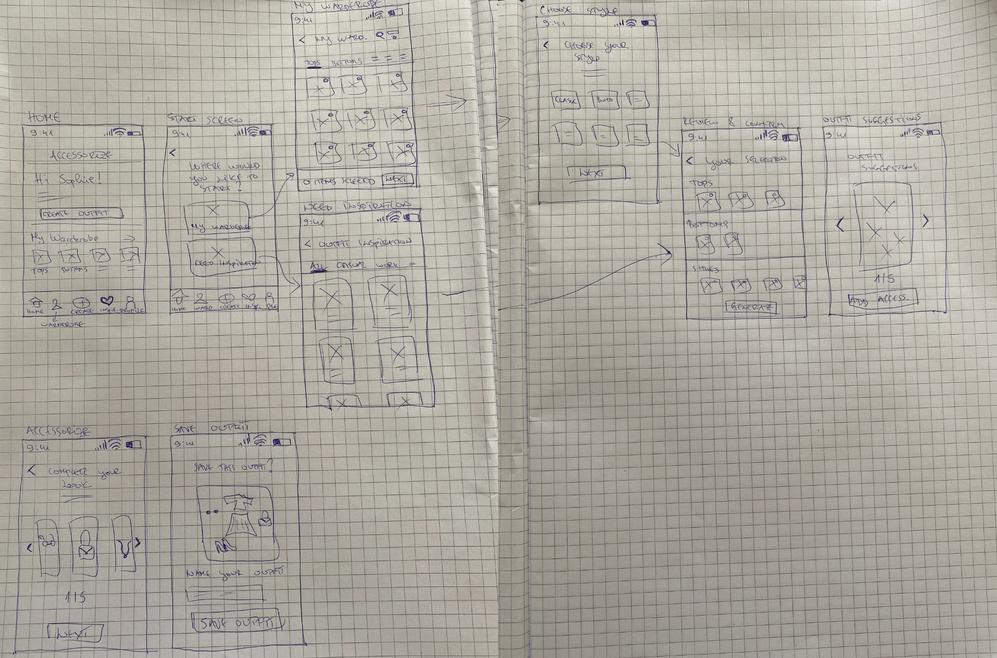
I began the design process with quick sketches to explore different ways of translating the research insights and user flow into a practical styling experience. Rather than committing to a single solution immediately, I explored different layouts and interaction patterns for the key parts of the journey, including wardrobe selection, style preferences, outfit recommendations, and accessory suggestions.
This early exploration helped me think through how users would move between these steps and how the information could be presented without making the experience feel overwhelming. Keeping the sketches low-fidelity made it easy to test different ideas, make changes, and build on the concepts that best supported the user’s needs.
Wireframes
I used wireframes to turn the initial concepts into a more defined product structure. At this stage, I focused on how the different features would work together and how users would move through the main styling journey. The wireframes allowed me to establish the information hierarchy, navigation, content placement, and key interactions before introducing the visual identity.
The main focus was on creating a straightforward experience that would guide users from selecting items and preferences to reviewing personalized outfit recommendations and completing their look with accessories. This provided a solid foundation for testing and further refinement.
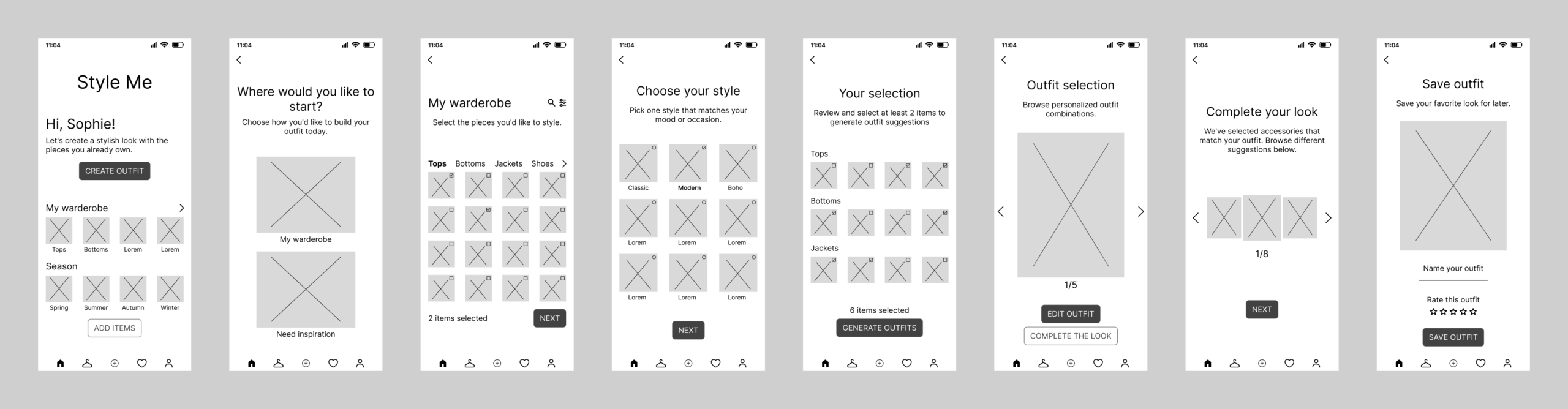
Low-Fidelity Wireframes
I explored the structure of the key screens and the core user flow, keeping the designs intentionally simple to focus on functionality rather than visual details and quickly identify areas that needed further refinement.
The wireframes helped me work through the main interactions, including starting an outfit, choosing between the user’s wardrobe and inspiration, selecting clothing and style preferences, generating recommendations, and moving toward accessory suggestions. This stage gave me a clearer foundation for developing the more detailed mid-fidelity experience.
Mid-Fidelity Wireframes
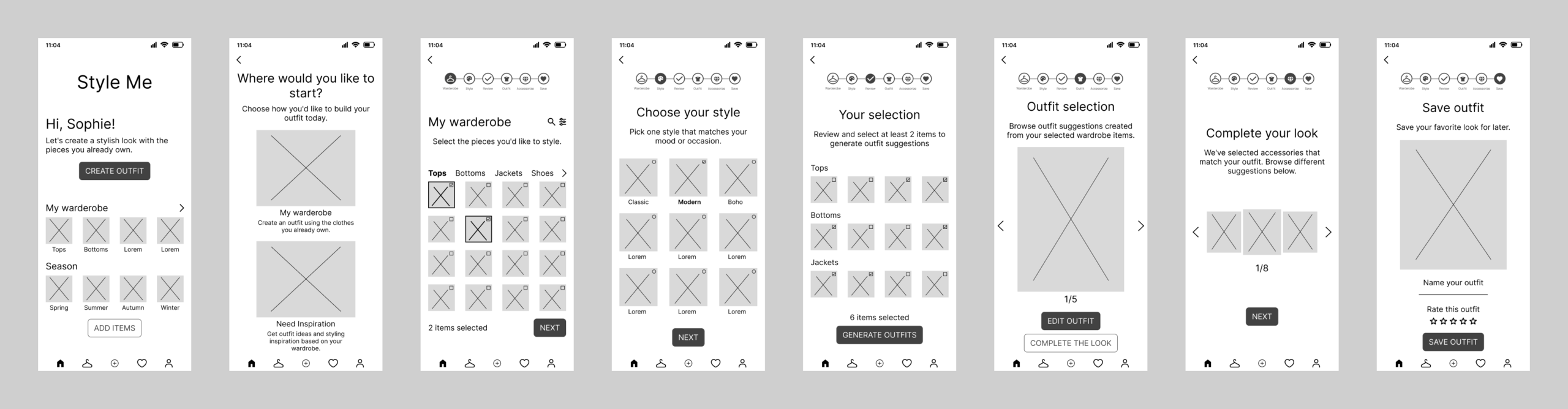
Building on the low-fidelity concepts, I developed mid-fidelity wireframes to refine the screen layouts, content hierarchy, navigation, and interactive elements. This stage helped me establish a more defined and consistent interface while keeping the visual design minimal. The resulting wireframes provided a stronger foundation for usability testing and the later high-fidelity design.
Mid-Fidelity Usability Testing
Testing the Experience Before Moving to High Fidelity
I conducted moderated usability testing using a Figma prototype with five participants to evaluate the mid-fidelity wireframes and the core outfit creation flow. The goal was to identify usability issues, understand where users needed more guidance, and refine the experience before moving into the high-fidelity design.
Testing Method
- Moderated usability testing
- Figma prototype
- Think-aloud method
- One-on-one sessions
What I Focused On
The testing focused on how easily users could:
- Understand how to start creating an outfit
- Choose between My Wardrobe and Need Inspiration
- Select clothing items and understand what had already been chosen
- Follow their progress through the styling flow
- Understand why specific AI recommendations were generated
Testing showed that users were generally able to complete the primary task, but several areas needed clearer guidance and feedback before moving forward. The findings led directly to a series of refinements to the mid-fidelity experience.
Before & After
Based on the usability testing findings, I refined the experience to make the styling flow clearer, improve interaction feedback, and help users better understand their progress and recommendations.
1. Clearer Entry Points
Before: Users needed more guidance when deciding between My Wardrobe and Need Inspiration.
After: Added supporting descriptions and improved labels to better explain each starting path.
2. Stronger Feedback During Clothing Selection
Before: Users expected clearer confirmation of which clothing items had already been selected.
After: Introduced stronger visual feedback, including a checkmark, to make selections easier to recognize.
3. Better Progress Visibility
Before: Users needed clearer indicators of where they were in the styling process.
After: Added clearer progress indicators and navigation cues to help users understand the flow.
4. More Transparent AI Recommendations
Before: Users wanted to understand why certain items were recommended together.
After: Added explanatory microcopy to make AI suggestions feel more transparent and useful.
Visual Direction
Once the core experience was refined through testing, I began developing the visual direction for the app. The goal was to create an interface that feels modern, elegant, approachable, and fashion-focused, while keeping the styling experience simple and easy to navigate.
Brand Personality
Modern • Minimal • Elegant • Personal • Timeless
Design Keywords
Capsule Wardrobe • Outfit Creation • Personal Styling • AI Recommendations • Minimalism • Neutral Fashion
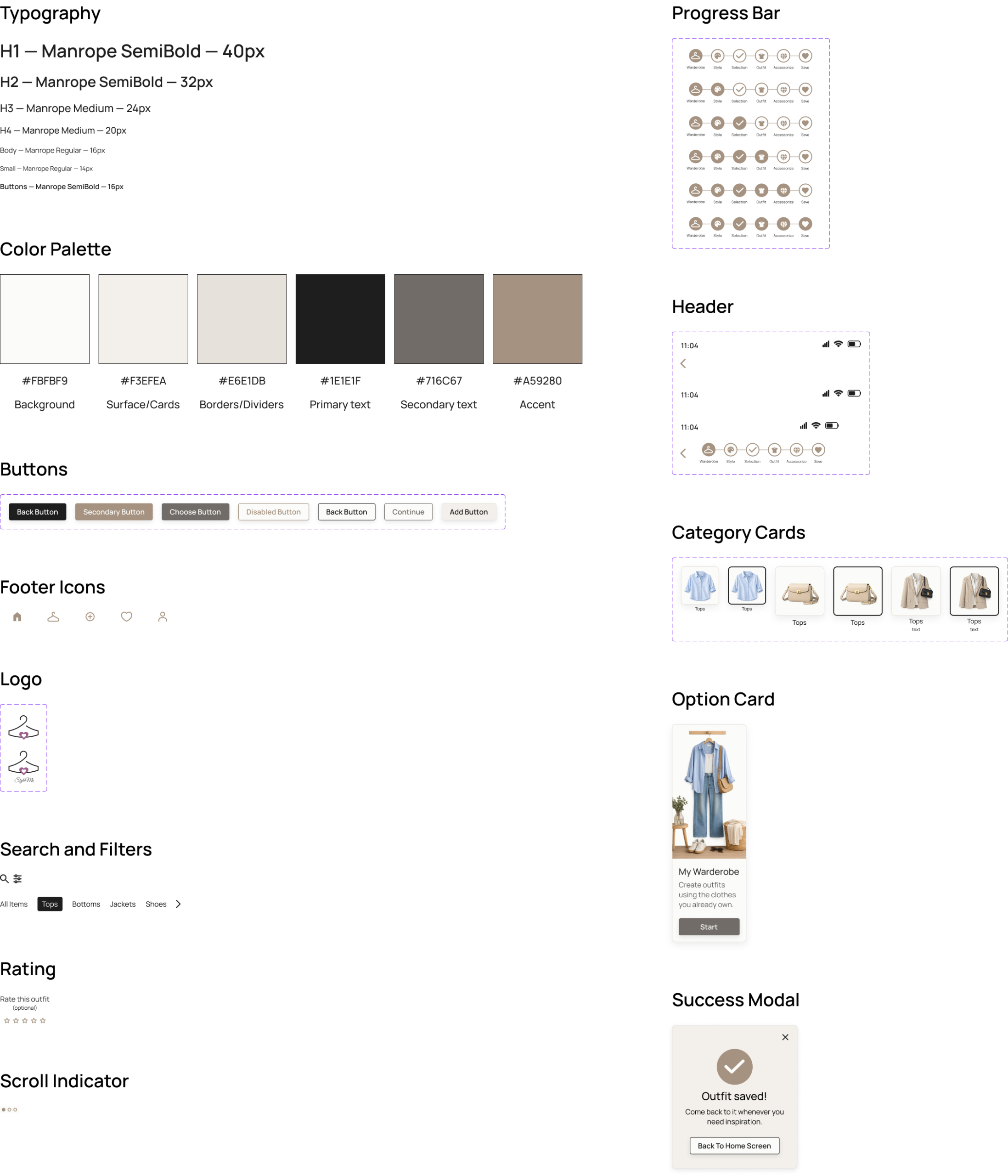
Color Palette
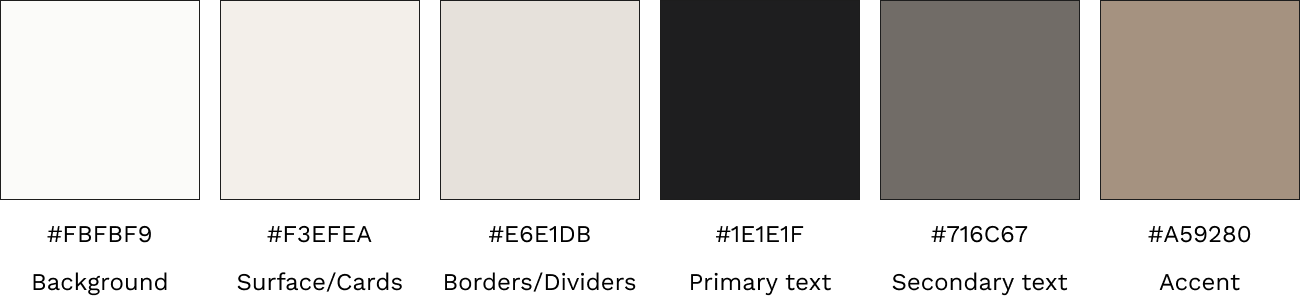
The color palette is inspired by timeless wardrobe essentials and neutral fashion tones. Warm whites, soft beige, and taupe create a calm and elegant experience, while charcoal provides strong contrast for readability. The accent color highlights important actions without overpowering the overall interface.
Typography
Manrope is used throughout the interface to create a clean, modern, and consistent visual language. Different font weights and sizes establish a clear hierarchy while maintaining excellent readability across all screens.

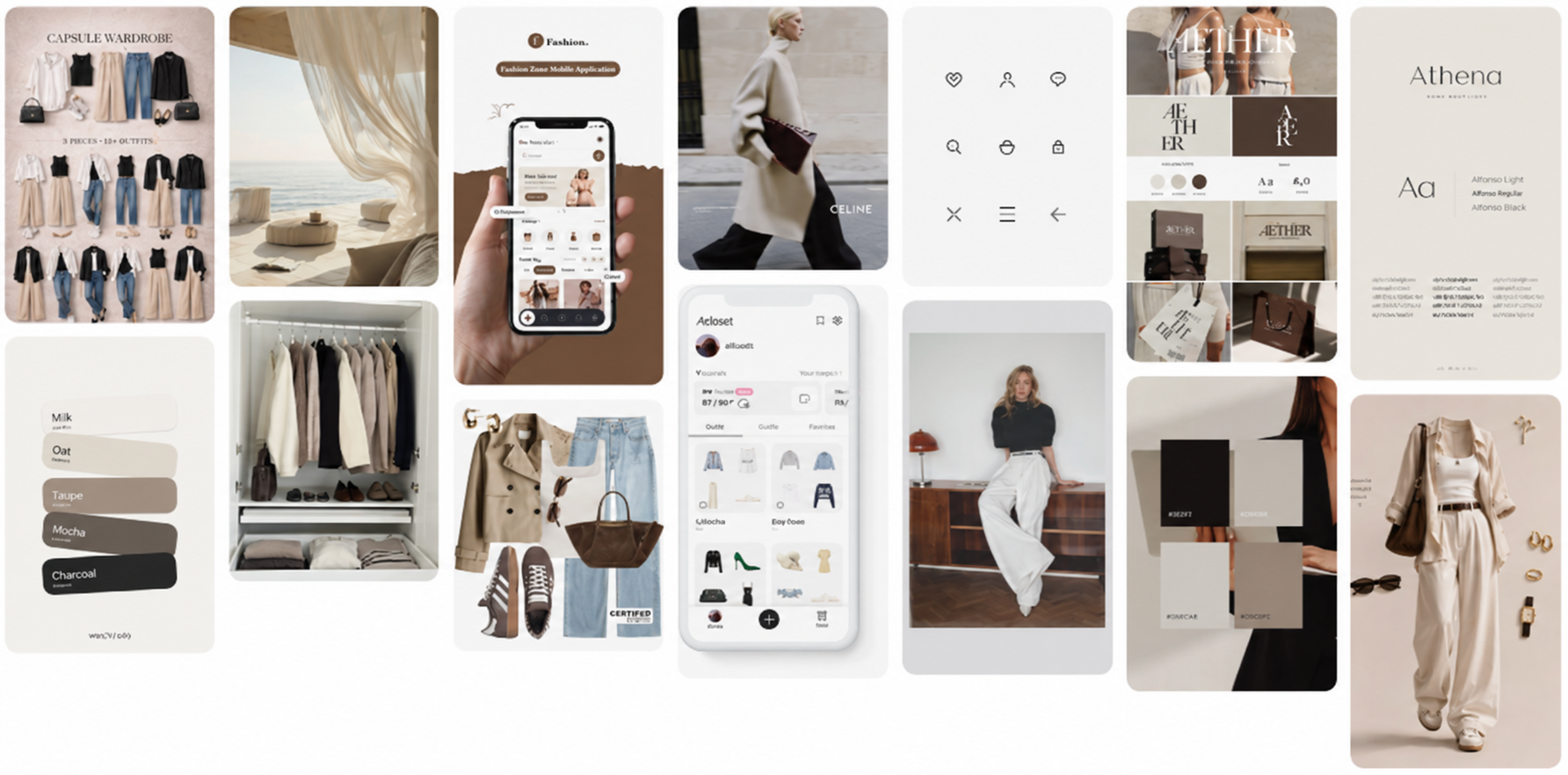
Visual Inspiration
The moodboard reflects a minimalist fashion aesthetic inspired by capsule wardrobes, neutral color palettes, premium editorial photography, and modern digital products. The overall direction emphasizes simplicity, timeless style, and effortless outfit creation.
UI Elements
The interface uses clean layouts, simple buttons, and minimal iconography to keep the focus on clothing and outfit recommendations. Rounded components and neutral colors create an intuitive and approachable user experience.
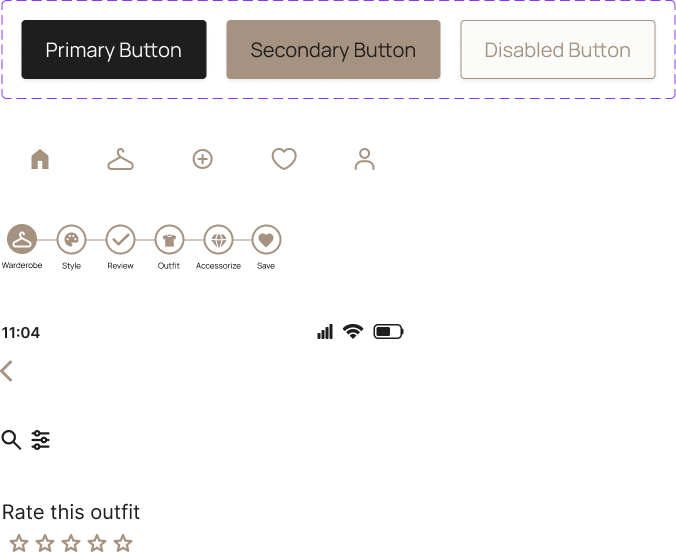
UI Components
I created a set of reusable UI components to maintain consistency across the StyleMe experience. The component library includes buttons, icons, navigation elements, and selection states, providing a cohesive visual language and a consistent foundation for the final interface.
Brand Identity
I wanted the brand identity to reflect the idea behind StyleMe: making everyday styling feel easier, more personal, and more enjoyable. The logo was designed to combine a fashion-forward and refined feel with simplicity, reflecting the app’s focus on helping users create polished looks without making the styling process feel complicated or overwhelming.
The visual direction was intentionally kept clean and elegant, allowing the fashion imagery and outfit recommendations to remain the focus of the experience. At the same time, the identity needed to feel approachable rather than overly editorial or exclusive, supporting the idea that personal styling should be accessible and effortless.
The final logo and visual language were designed to work consistently across the app, creating a recognizable identity while maintaining a cohesive experience throughout the different screens and interactions.
Logo Sketches and Process
I explored different logo concepts inspired by the idea of a wardrobe and personalized styling. Through sketching and refinement, I developed a hanger symbol combined with a heart to represent clothing, self-expression, and the personal connection people have with their style.
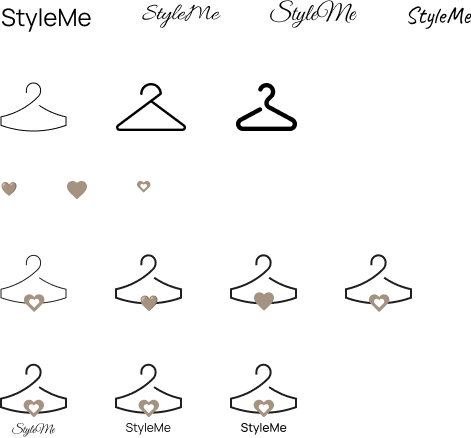
Final Logo at 48px, 128px and 256px Scaling
I refined the final logo to ensure it remains clear and recognizable across different sizes. I tested the logo at 48px, 128px, and 256px to maintain legibility and consistency across the app interface and other brand touchpoints.
High-Fidelity Design
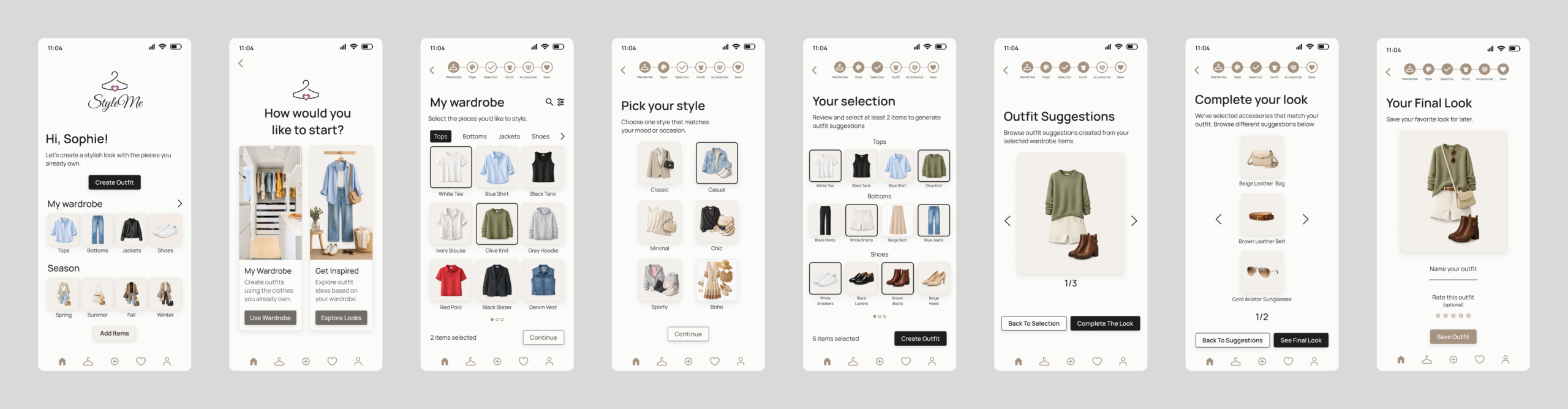
With the structure and interactions refined through wireframing and usability testing, I translated the final concepts into a high-fidelity mobile interface. The focus was on creating a polished and cohesive styling experience while maintaining the clarity established during the earlier design stages.
I applied the visual direction, typography, color palette, imagery, and UI components to the core user journey, bringing together the wardrobe, outfit creation, personalized recommendations, and accessory suggestions into a consistent experience.
The final screens demonstrate how the research insights and testing feedback were translated into a more intuitive and visually engaging product experience.
High-Fidelity Usability Testing
Validating the Final Experience
After completing the high-fidelity prototype, I conducted a final remote usability test with five participants to evaluate the complete outfit creation experience. Each session lasted approximately 15–20 minutes and focused on the main journey, from selecting wardrobe items and a preferred style to generating recommendations, adding accessories, and saving an outfit.
Results at a Glance
- 100% task completion — 5/5 participants
- 1:35 average completion time
- 4.7 / 5 average ease-of-use rating
- 5/5 participants said they would use the app
What Worked Well
Participants found the overall outfit creation flow intuitive and were able to complete the full task without moderator assistance. They particularly enjoyed creating outfits using their own wardrobe rather than browsing generic inspiration, while the style selection helped make the experience feel more personalized.
Areas for Improvement
The testing also revealed four smaller usability issues:
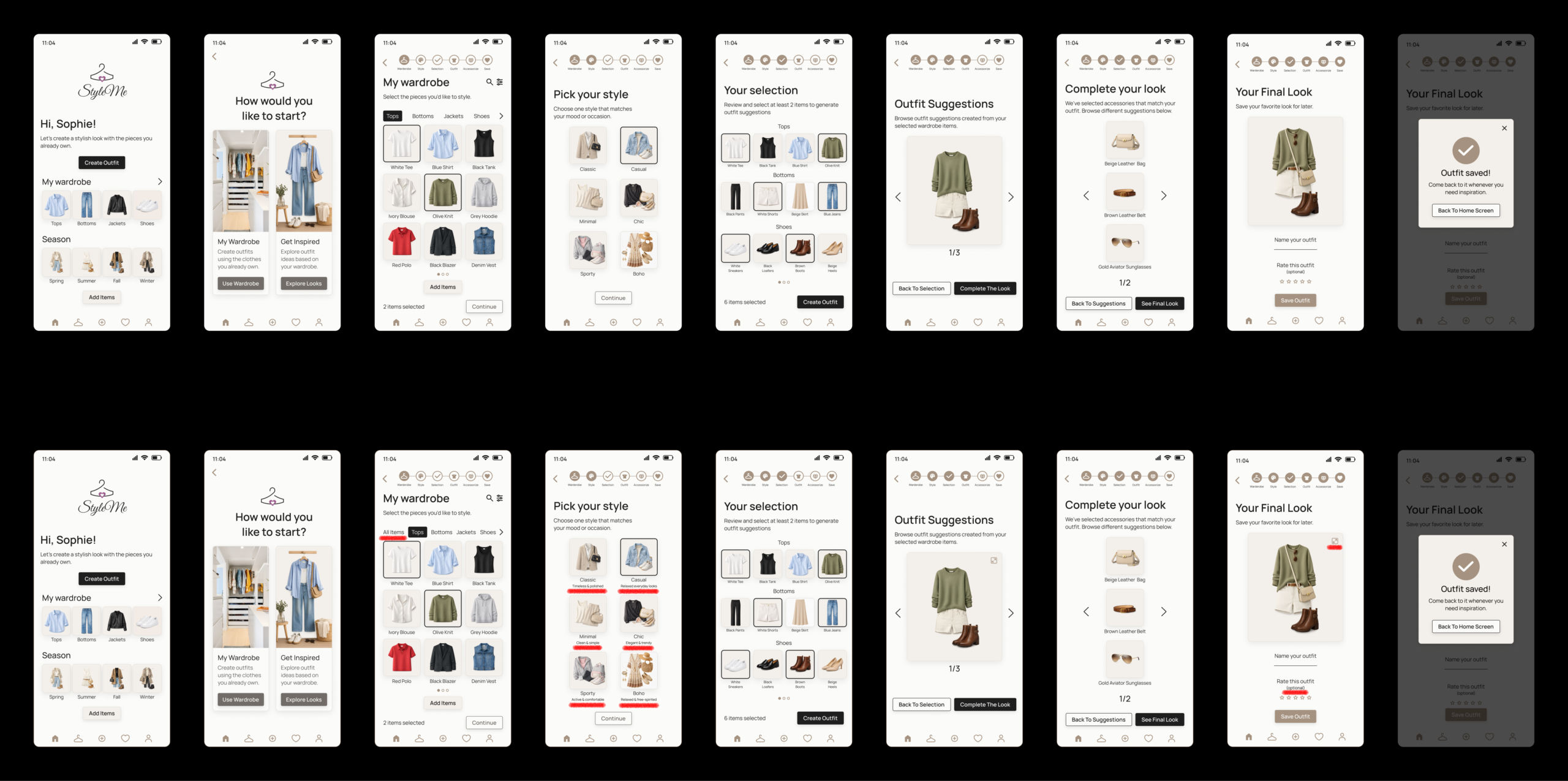
- Outfit preview: 3 participants expected the preview to be interactive.
- Rating before saving: 2 participants were unsure whether rating an outfit was required.
- Wardrobe navigation: 3 participants expected an “All Items” option.
- Style categories: 2 participants found Classic and Chic too similar.
These findings did not require changes to the overall concept or user flow, but they highlighted opportunities to improve clarity, navigation, and interaction cues in future iterations.
Before & After
Turning Feedback Into Design Improvements
The final usability testing revealed several small interaction and navigation issues that could be improved without changing the overall concept or core user flow. I used these findings to refine the interface and make key actions more intuitive, visible, and easier to understand.
The changes are highlighted in red on the After screens to make the improvements easier to identify.
Impact
The final usability testing showed that the core StyleMe experience was successful in helping users create personalized outfits using their existing wardrobe. All five participants completed the primary task without assistance, with an average ease-of-use rating of 4.7/5, and all participants said they would use the app. The results also highlighted several smaller usability improvements that could further improve clarity and navigation in future iterations.
Final Prototype
The final interactive prototype brings the StyleMe experience to life, allowing users to explore their wardrobe, create outfits, and discover personalized styling recommendations. It demonstrates how the app helps users combine clothing and accessories they already own, making everyday outfit planning simpler, more intuitive, and more personalized.
Explore the interactive prototype below.
Reflection
This project reinforced how important it is to let research guide the design rather than relying on assumptions. I learned that a seemingly simple styling problem involves several layers of decision-making, from choosing clothing and accessories to understanding personal style and feeling confident in the final look.
The biggest takeaway was the value of iterative testing. Each testing round helped me identify small moments of uncertainty that were easy to overlook during the design process. Refining these details made the experience clearer and more intuitive, while also reminding me that successful UX is often about removing friction from seemingly small interactions.
I also gained more confidence in designing a product from an ambiguous problem through research, information architecture, user flows, wireframes, testing, and final UI. This project strengthened my ability to connect user needs with design decisions and to use feedback as an essential part of the design process.